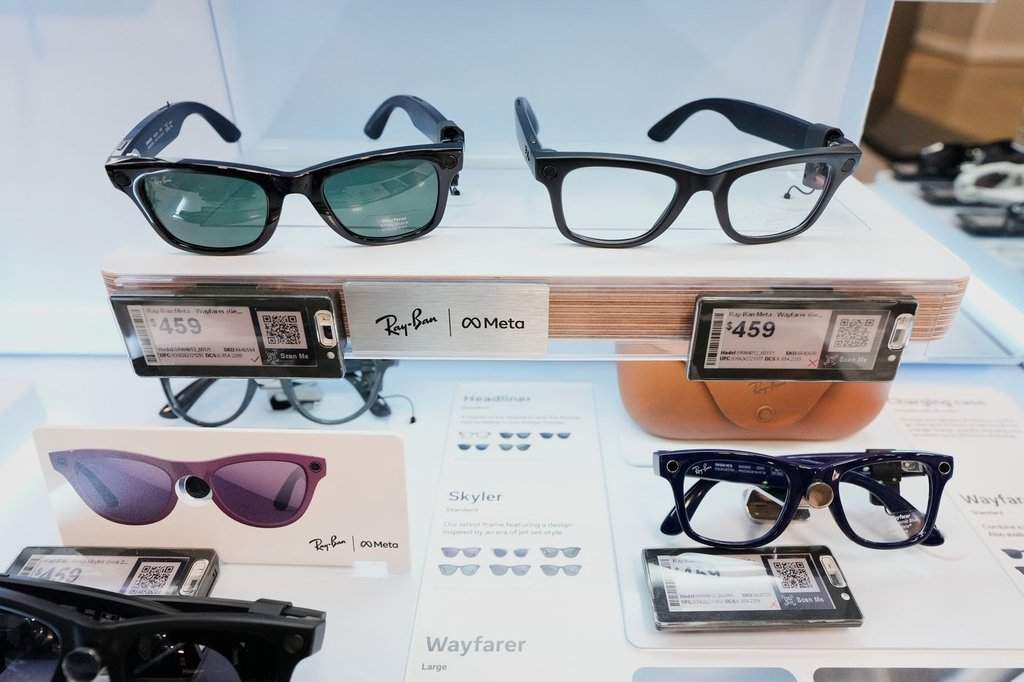
Picture walking into a shop, pulling a bait-and-switch with fake eyewear, walking out with a high-tech prize, and accidentally handing the cops a crystal-clear video of your own face. That's basically what happened in Cookstown, Ontario, when a thief targeted stolen smart glasses and forgot one crucial detail about how connected wearables work.
South Simcoe Police say a man walked into a Cookstown eyewear store on November 11 around 7:30 p.m. and asked to try on Ray-Ban Meta smart glasses. According to police reports covered by Global News, he allegedly swapped the real pair for a counterfeit set he brought with him, handed the fakes back to staff, and walked out. Classic distraction play. Except while he was testing the frames and checking himself out in a mirror, he unintentionally hit the record button. That clip synced straight to a paired device back in the store, giving investigators clear video of the suspect wearing the exact eyewear he walked off with.
Honestly, it's a wild reminder of how weird wearable tech can be when paired hardware, cloud sync, and human carelessness collide. Thieves usually worry about security cameras or find-my-phone trackers. They rarely think about the camera sitting right above their own eyebrows, quietly capturing evidence for the people they just ripped off.
How Stolen Smart Glasses Leave Digital Breadcrumbs Behind
Most people think of smart glasses as a convenience play. Tap the temple, snap a photo of a street sign or a recipe, send a quick voice note, keep moving. When someone steals a pair, though, the device doesn't automatically know its owner changed. If the glasses are already paired with a phone, tablet, or demo unit in a retail shop, anything captured while connected can land on that linked device or account.
In the Cookstown case, store staff spotted the counterfeit swap and checked a device previously paired with the glasses. There sat video of the suspect trying them on in front of a mirror. Police later shared images from the footage on social media and opened occurrence number PW26000297 while asking the public for help identifying him. Think about how ironic that is. A swap meant to fool workers on the sales floor ended up turning the hardware into a self-reporting witness.
From a hands-on security standpoint, I've seen plenty of users—and plenty of bad actors—misjudge where data actually lives on smart wearables. A lot of folks assume a gadget needs a big screen or an obvious menu to record or sync. Wrong. Modern smart frames pack tiny cameras, microphones, Bluetooth, and Wi-Fi into hinges that look almost identical to regular acetate or metal frames. If a button gets pressed by mistake while someone adjusts the nose pads or tucks the arms behind their ears, a video can start rolling before they even notice.
The Counterfeit Swap Mistake Nobody Talks About
Swapping real luxury or tech items with convincing fakes has been around forever in retail theft. People bring a lookalike watch, sneaker box, or pair of sunglasses, count on a busy clerk not inspecting every detail in the moment, and slip out before anyone notices.
With smart glasses, that old trick runs into a new snag. These aren't passive chunks of plastic and glass. Even when a pair looks ordinary on the outside, internal sensors, pairing states, and companion apps tie the physical frame to a digital trail. A counterfeit pair won't sync with a store's paired setup or carry genuine firmware telemetry, making the mismatch obvious once staff check what happened. Meanwhile, the real pair still has active hardware behavior tied to whatever pairing or capture state was in motion.
I've watched retail managers get burned by high-value small items because staff trust the handoff too much during busy evening rushes. Around 7:30 p.m., stores are often juggling fitting rooms, questions, and closing prep. Someone acting casual while asking to try on trendy eyewear doesn't always set off alarm bells right away. Until someone checks the paired device and realizes the suspect filmed his own audition.
What This Case Reveals About Smart Glasses Privacy and Security
This story is funny on the surface, sure. A guy tries to pull a fast one and accidentally records himself. Look a little closer, though, and it highlights real tensions around smart glasses privacy and device security that affect regular people every single day.
According to a November 2026 report from Security.org, roughly six in ten adults distrust smart glasses manufacturers to follow strong video and data privacy practices, and only three percent say they strongly trust them. That skepticism isn't coming out of nowhere. Wearables with built-in cameras blur the line between personal memory capture and bystander surveillance, especially in public spaces where people don't expect to be filmed.
Researchers and security analysts have also been digging into how these ecosystems behave behind the scenes. In October 2026, Cybernews tested seven AI smart glasses apps and found wide differences in requested permissions, embedded trackers, and safeguards around the recording indicator light. Only a handful of brands—including Meta, Rokid, and Solos—had confirmed protections that stop recording if someone covers the capture LED. That matters because an indicator light is supposed to warn nearby people when video is rolling. Cover it up with a sticker or dark tape, and the visual cue disappears unless the firmware blocks filming.
There's also a flip side worth being honest about. While recording indicators and pairing rules are meant to protect bystanders and users, the exact same connectivity that helps catch a thief in a mirror can create headaches if a legitimate user loses their glasses or has them stolen. If the glasses get reset, go out of range, or aren't tied to an account that supports remote lock or location tracking, recovering them gets tricky fast.
Why Pairing States Matter More Than People Realize
Pairing sounds simple. You connect your glasses to your phone once, and everything works. In practice, pairing and sync behavior depend on specific conditions: Bluetooth proximity, Wi-Fi access, app permissions, and whether the device is actively linked to an account or local terminal.
If a device is still connected or synced to a paired device during or right after an incident, logs, photos, or video clips might transfer over automatically. If it isn't paired—or if someone wipes it before a sync happens—you might get nothing at all. That's why I always tell people not to treat smart glasses like a guaranteed GPS tracker or an automatic security camera. Sometimes they hand over gold, like in Cookstown. Other times, they're just expensive sunglasses walking out the door.
Even for everyday owners, leaving default settings untouched can backfire. According to guidance from WeLiveSecurity, voice wake words, cloud AI prompts, and companion app galleries can store sensitive snippets if you don't audit them regularly. Imagine accidentally recording a bank screen, a PIN pad, or a private conversation while adjusting your frames at a coffee shop. Most people don't think about that until a clip shows up in their gallery weeks later.
Common Misconceptions About Smart Glasses and Theft
Whenever a viral crime story involves smart tech, myths spread fast. Let's clear up a few things that trip people up.
First, smart glasses don't automatically stream live video to the police or to a stranger's phone just because they're stolen. In the Cookstown incident, the video ended up on a paired device that staff checked after noticing the swap, and the suspect had inadvertently triggered recording while trying the glasses on. That was a specific set of circumstances, not magic remote surveillance built into every pair on the market.
Second, buying cheap knockoff camera glasses isn't a harmless shortcut. Security researchers at Malwarebytes have warned that budget camera glasses lacking solid pairing controls, account authentication, and ongoing security updates can pose serious privacy and security risks. When a device skips basic security hygiene, data exposure and unauthorized access become much bigger worries.
Third, wearing smart glasses doesn't give anyone a free pass to film wherever they want without pushback. Even where public photography laws allow filming in open spaces, businesses set their own rules on private property, and workplaces, clinics, and secure facilities have strict policies against cameras. In fact, wireless security specialists at Bastille have pointed out that covert recording in sensitive environments—from offices to testing rooms—is a growing concern precisely because tiny frames don't look like traditional cameras.
What Retailers and Everyday Users Get Wrong
Retailers selling high-ticket wearables face a tough balancing act. Customers want to pick up frames, feel the weight, check the fit in a mirror, and test how they look. Locking every demo unit behind glass or tethering it to a counter kills the try-on experience. Yet leaving high-value tech unmonitored during busy hours invites swap scams and walk-offs.
One common mistake in retail is relying purely on visual memory during busy shifts. If a clerk hands over a pair of smart glasses and gets pulled away for two minutes, a quick sleight-of-hand swap becomes way easier. Checking serial numbers, inspecting hinges and lenses before and after try-ons, and keeping a close eye on paired demo devices are small habits that make a big difference.
Everyday users make their own mistakes too. Many folks pair their wearables, skip reading the privacy and storage controls, and forget that accidental button presses happen all the time. Putting glasses in a bag, setting them down on a table, or pushing them up your nose can trigger a photo or video if you don't know the touch and button controls cold.
Is there any downside to tight privacy restrictions on smart glasses? Sure. Stricter LED rules, fewer background permissions, or offline-only modes can make features feel less convenient or slow down cloud AI helpers. There's a real trade-off between instant convenience and tight data control, and different people draw that line in different places. Still, knowing how your gear behaves puts you way ahead of people who just tap buttons and hope for the best.
Practical Next Steps You Can Take Right Now
Whether you run a shop that sells smart eyewear, own a pair of smart glasses yourself, or just want fewer surprises with wearable tech, a few straightforward moves go a long way.
- Audit your companion app settings today: Open the app paired with your glasses, check what permissions it holds, review recent photos and videos, and delete anything captured by accident.
- Check indicator light and recording behavior: Make sure your glasses are running current firmware so built-in recording safeguards work properly, and never slap tape or stickers over a capture light thinking it's just a cosmetic detail.
- Train retail staff on try-on handoffs: If you work in or manage an eyewear or electronics shop, require a quick check of the physical frames and paired device whenever high-value smart glasses are tried on and returned, especially during evening rushes.
- Keep serial numbers and pairing info handy: Write down or save the serial number and model details of any expensive wearable you buy so you have accurate information if the device ever goes missing or gets stolen.
- Watch your surroundings in public: If you're entering a PIN, reading sensitive account info, or having a private chat near someone wearing smart glasses, shift angles or step somewhere more private rather than assuming nobody is recording.
That Cookstown suspect probably thought his fake glasses trick was clever enough to slip past everyone. Instead, an accidental recording turned his own gear against him—a pretty fitting reminder that tech has a funny way of catching people off guard.